
For language assistants who have spent at least an academic year in Spain and wish to renew as assistants for the next academic year, there’s a need to (1) request for an extension of stay (prórroga de estancia) and (2) renew the tarjeta de identidad de extranjero (TIE) by submitting the requirements and doing a fingerprint (toma de huellas) at the police station (comisaría). In this article, I’d like to share the steps on how to process the prórroga de estancia online using a digital certificate.
Things you need
- Digital certificate (I’ll write a separate blog on how to get this)
- Installed Autofim@ app (download it here: https://firmaelectronica.gob.es/Home/Descargas.html)
- Scanned version of the requirements for your prórroga de estancia para investigación y estudios
- Tasa modelo 790 código 052
- TIE (front and back)
- Passport (bio page, student visa page, stamp of the date of entry in Spain)
- Old carta de nombramiento
- New carta de nombramiento
- Certificado de aprovechamiento
Steps
- Go to the Extranjería’s website: https://sede.administracionespublicas.gob.es/procedimientos/index/categoria/34
- Among the listed procedures, choose MERCURIO – Solicitudes de autorizaciones de Extranjería y Aportación de documentación: Presentación Telemática y aportación de documentación a expedientes de extranjería.

- In the next page, it shows you the list of Extranjería procedures that may be done online. Also, it tells you the technical requirements to access it. Scroll down and click Acceder a Solicitudes Telemáticas de Autorizaciones de Extranjería.

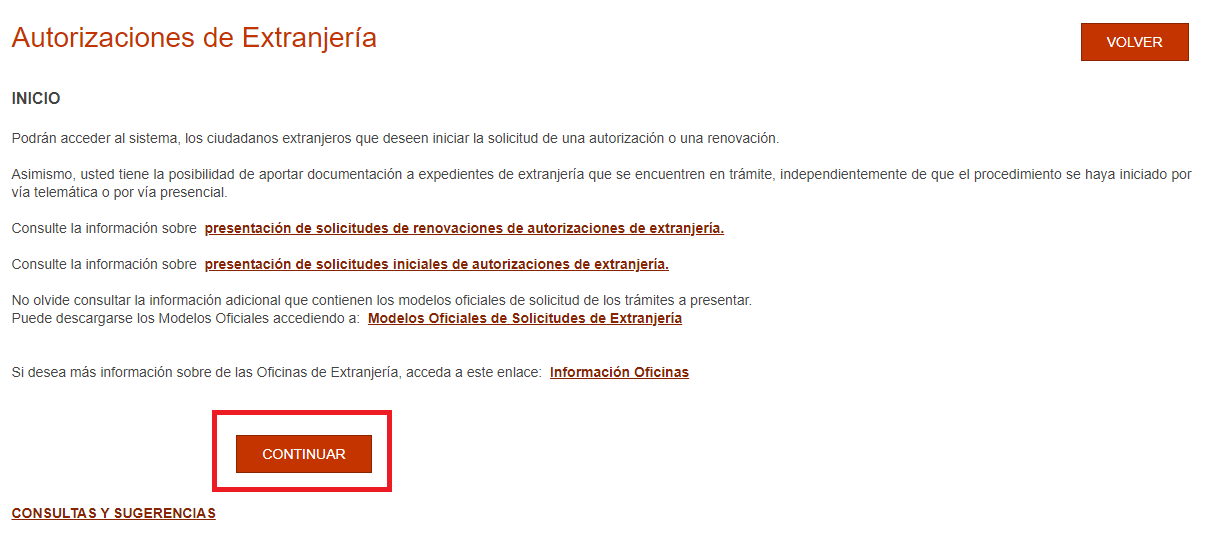
- The next page lets you read more information about renewing or initial request for extension of stay. Click CONTINUAR.

- In the next page, it shows you modes of access. Click CONTINUAR INDIVIDUAL.

- Now, your digital certificate pops up. As said, without it, you may not be able to process the extension of stay online. Click OK to proceed.

- To create a new request, whether it’s initial or renewal of extension of stay, click CONTINUAR PRESENTACIÓN.

- A pop-up window appears. Select Presentar renovación/Obtener resguardo renovación. Then, click CONTINUAR.

- Fill in the required fields: NIE, Nacionalidad, Fecha de caducidad, and Año de nacimiento. No need to fill in the N° de Expediente. Then, click ACEPTAR.

- Next, it must auto populate the information at the top of the page, including the text Estancia por estudios…(art 40) and the Provincia de presentación (ex: MADRID). If they´re correct, then click CONFORME.

- The next page is for selecting forms. Tick EX00 - Solicitud de autorización de estancia y prórrogras.
- The next page is the digital version of the Modelo EX-00 (page 1). Fill in the fields correctly.


- DATOS PERSONALES (PERSONAL DATA). Note: For Filipinos, we don’t have a 2º apellido, so leave it blank. Do not confuse it with the middle name. The 1º apellido is your father’s last name.
- DOMICILIO EN ESPAÑA (ADDRESS IN SPAIN). Write your complete address, mobile phone number, and email. Note: If you have a different address from what’s written on your TIE, it’s fine. Write your current address in Spain. Note that it’s asked to primarily know where they’ll mail the result.
- REPRESENTANTE LEGAL, EN SU CASO (LEGAL REPRESENTATIVE, IF APPLICABLE): No need to fill in anything in this part. Leave the fields blank.
- For Motivos que justifican la solicitud y tiempo de prorroga solicitada, you may simply type AUXILIARES DE CONVERSACIÓN.
- At the bottom, tick the Consiento la comprobación… By ticking this, you allow them to check your data and address. Once done, click SIGUIENTE.
- Fill in page 2 of the Modelo EX-00.

- DATOS DEL PRESENTADOR DE LA SOLICITUD (DATA OF THE REQUESTER). Write your complete name.
- DOMICILIO EN ESPAÑA (ADDRESS IN SPAIN). Write the same address, mobile phone, and email you wrote in the previous page.
- Tick Solicito/Consiento que las comunicaciones y notificaciones se realicen por medio electrónicos. By ticking this, you simply allow them to contact you electronically. Once done, click SIGUIENTE.
- A popup window appears. Click Aceptar to proceed.
- The next part is for uploading the scanned requirements. To do so, click PRESENTACIÓN ELECTRÓNICA.

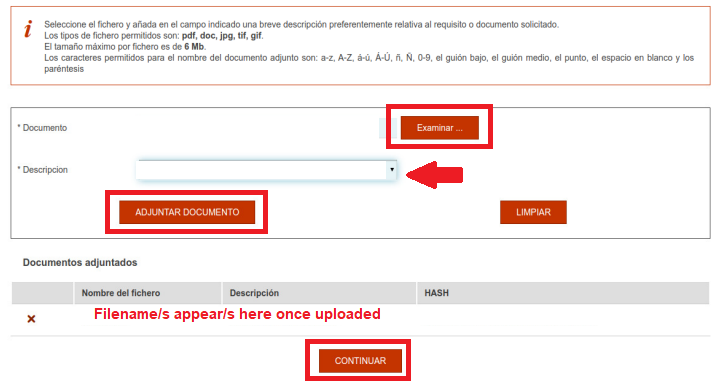
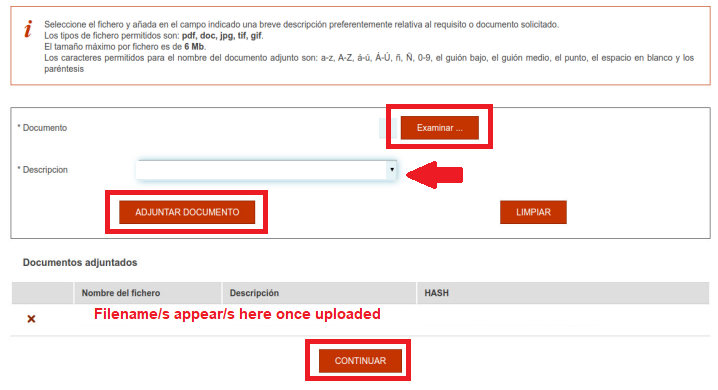
- To upload a file, click EXAMINAR (BROWSE). Choose the file you want to upload. Then, click ADJUNTAR DOCUMENTO (ATTACH DOCUMENT). *Tip: I advise to merge all scanned documents in one PDF file. It will save you time uploading documents and make it easier for Extranjería to view all your documents. If you do so, under the Descripción (Description) dropdown, select OTROS (OTHERS) and type DOCUMENTACION COMPLETA (ALL DOCUMENTS). Once finished, click CONTINUAR.
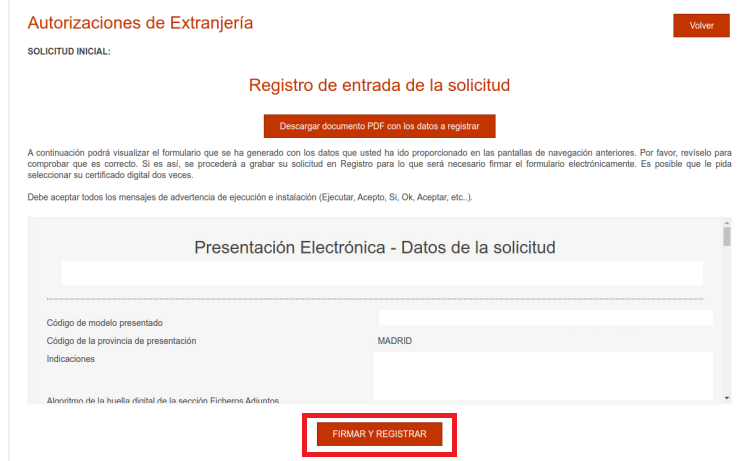
- The next page is the summary of the form you’ve filled up. It asks you to register and digitally sign it. To do so, click REGISTRAR Y FIRMAR. A popup appears showing your digital certificate to proceed with digital signing. With this, make sure your Autofirm@ app has the latest version.
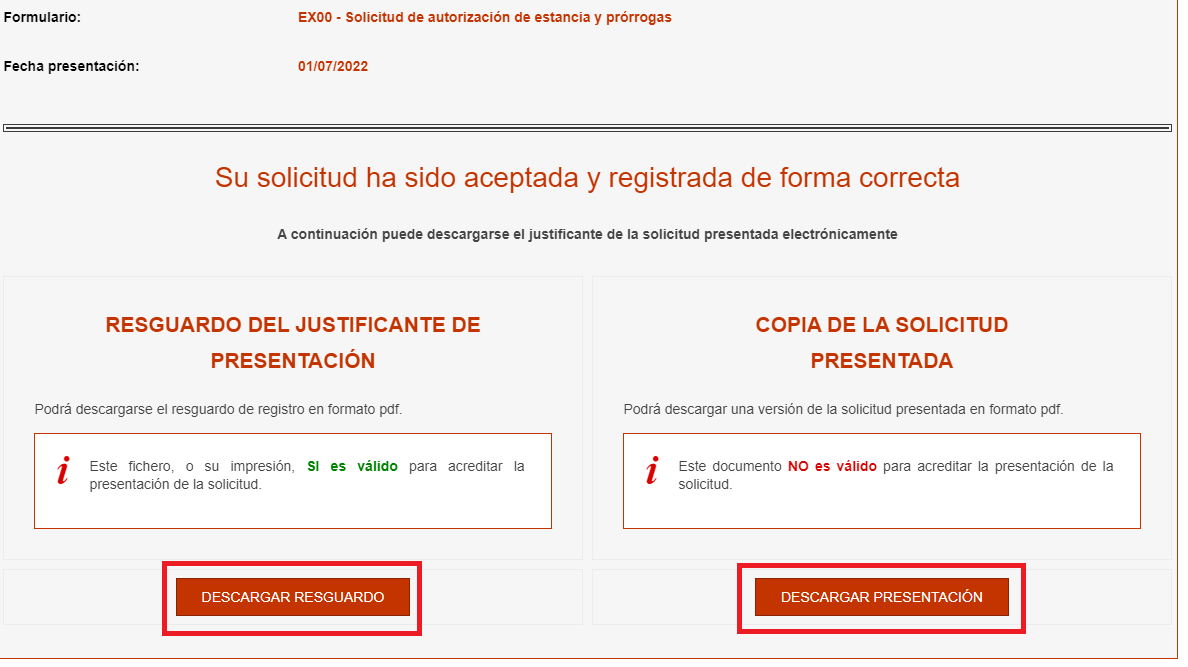
- The last page gives you the confirmation that your request has been accepted and registered correctly (hurray!). For your reference you may click DESCARGAR RESGUARDO (which you may use to request for an autorización de regreso to go to the Philippines or your country of origin and be able to return to Spain without a valid visa) and DESCARGAR PRESENTACIÓN (which is a digitally signed copy of the Modelo EX-00 you filled up).






To check the status of your application of extension of stay, you may use this link: https://sede.administracionespublicas.gob.es/infoext2/consulta.html. Usually, it takes 3 months to get a Resultado Favorable if sent via OAC (Oficina de Atención al Ciudadano) or Correos. If done via digital certificate, it takes shorter (I’ll update soon on how long it took mine).
Once you get a Resultado Favorable, then you may proceed with the renewal of the TIE at the comisaría (police station) as this result is one of its requirements. With my experience last year, I didn’t wait for the mailed version of this result. I simply printed the result from the Extranjería’s website and presented it at the police station.
0 Response to "How to process the prórroga de estancia para investigación y estudios online via digital certificate (Cl@ve)"
Post a Comment